
TeltoHeart First Start: Difference between revisions
No edit summary |
|||
| (2 intermediate revisions by the same user not shown) | |||
| Line 76: | Line 76: | ||
════════════════════════════════════════════════ --> | ════════════════════════════════════════════════ --> | ||
== How to charge TeltoHeart == | == How to charge TeltoHeart == | ||
<div style="background:#ffffff; border:1px solid #e0e8f4; border-radius:12px; overflow:hidden; margin-bottom:8px;"> | <div style="background:#ffffff; border:1px solid #e0e8f4; border-radius:12px; overflow:hidden; margin-bottom:8px;"> | ||
{| style="width:100%; border-collapse:collapse;" | {| style="width:100%; border-collapse:collapse;" | ||
|- | |||
| style="padding:28px 32px 20px;" | | |||
{| style="width:100%; border-collapse:collapse;" | {| style="width:100%; border-collapse:collapse;" | ||
|- | |- | ||
| style="width:52px; vertical-align:top; padding: | | style="width:52px; vertical-align:top; padding-bottom:16px;" | [[Image:Nr1.png|40px|link=]] | ||
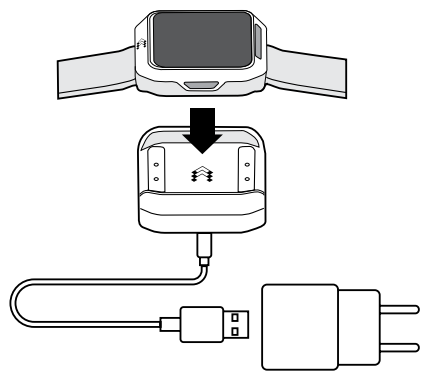
| style="padding:0 0 | | style="vertical-align:top; padding:0 0 16px 16px; font-size:15px;" | Insert a USB Type-C cable into the charging dock. | ||
|- | |- | ||
| style="width:52px; vertical-align:top; padding: | | style="width:52px; vertical-align:top; padding-bottom:16px;" | [[Image:Nr2.png|40px|link=]] | ||
| style="padding:0 0 | | style="vertical-align:top; padding:0 0 16px 16px; font-size:15px;" | Place TeltoHeart on the charging dock included in the packaging. | ||
|- | |- | ||
| style="width:52px; vertical-align:top | | style="width:52px; vertical-align:top;" | [[Image:Nr3.png|40px|link=]] | ||
| style="padding: | | style="vertical-align:top; padding-left:16px; font-size:15px;" | Insert the charging unit into the power source. | ||
|} | |} | ||
|- | |- | ||
| style="padding:0 32px | | style="padding:0 32px 20px; text-align:center;" | | ||
[[ | [[Image:Charging.png|center|link=]] | ||
|- | |- | ||
| style="padding:0 32px 28px;" | | | style="padding:0 32px 28px;" | | ||
{| style="width:100%; border-collapse:collapse; background:#EEF6FF; border-left:4px solid #0054A6;" | |||
[[File:Note_icon.png|24px|link=]] | |- | ||
| style="width:36px; vertical-align:top; padding:14px 0 14px 14px;" | [[File:Note_icon.png|24px|link=]] | |||
| style="vertical-align:top; padding:14px 18px; font-size:14px;" | '''Note:''' The battery life lasts for '''at least 24 hours'''. | |||
|} | |} | ||
|} | |||
</div> | </div> | ||
== Overview == | == Overview == | ||
| Line 310: | Line 306: | ||
|} | |} | ||
<div style="text-align:center; margin:8px 0 20px;">[[File:Screen195.png|link=|480px]]</div> | <div style="text-align:center; margin:8px 0 20px;">[[File:Screen195.png|link=|480px|border|class=tlt-border|link=|center]]]</div> | ||
{| style="width:100%; border-collapse:collapse;" | {| style="width:100%; border-collapse:collapse;" | ||
| Line 318: | Line 314: | ||
|} | |} | ||
<div style="text-align:center; margin:8px 0 20px;">[[File:Screen253.png|link=|480px]]</div> | <div style="text-align:center; margin:8px 0 20px;">[[File:Screen253.png|link=|480px|border|class=tlt-border|link=|center]]]</div> | ||
{| style="width:100%; border-collapse:collapse;" | {| style="width:100%; border-collapse:collapse;" | ||
| Line 326: | Line 322: | ||
|} | |} | ||
<div style="text-align:center; margin:8px 0 20px;">[[File:Screen241.png | <div style="text-align:center; margin:8px 0 20px;">[[File:Screen241.png|link=|center|480px|border|class=tlt-border|link=|center]]]</div> | ||
{| style="width:100%; border-collapse:collapse;" | {| style="width:100%; border-collapse:collapse;" | ||
| Line 398: | Line 394: | ||
|} | |} | ||
<div style="text-align:center; margin:8px 0 20px;">[[File:Screen285.png|link=|480px]]</div> | <div style="text-align:center; margin:8px 0 20px;">[[File:Screen285.png|link=|480px|border|class=tlt-border|link=|center]]]</div> | ||
{| style="width:100%; border-collapse:collapse;" | {| style="width:100%; border-collapse:collapse;" | ||
| Line 406: | Line 402: | ||
|} | |} | ||
<div style="text-align:center; margin:8px 0 20px;">[[File:Screen292.png|link=|560px]]</div> | <div style="text-align:center; margin:8px 0 20px;">[[File:Screen292.png|link=|560px|border|class=tlt-border|link=|center]]]</div> | ||
{| style="width:100%; border-collapse:collapse;" | {| style="width:100%; border-collapse:collapse;" | ||
Latest revision as of 08:38, 17 June 2026
Main Page > TeltoHeart > TeltoHeart First Start
Contents of the box
|
1 × ITEM Continuous heart monitoring smart wearable with optical sensor and display.
|
1 × ITEM USB-C dock, powered via 5 V DC. Place TeltoHeart in recess to charge.
|
1 × DOCUMENT Condensed reference card covering essential device knowledge and key functions.
|
1 × CABLE Connects the charging dock to a standard USB-A power source.
|
1 × DOCUMENT Illustrated step-by-step instructions for initial setup, pairing, and first use of the TeltoHeart device. Recommended starting point for new users.
|

Note: TeltoHeart is supplied with a charging dock powered via USB Type-C connector at 5 Vdc. |
Note: TeltoHeart is intended for users aged 22 and above. |
How to wear TeltoHeart
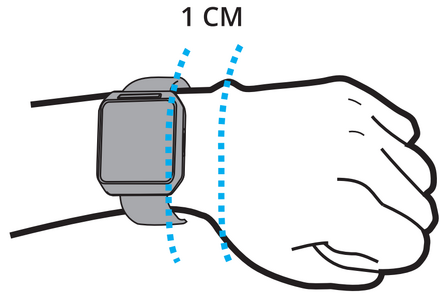
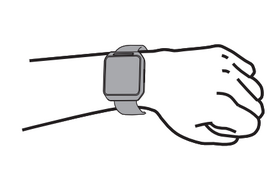
Secure TeltoHeart around your left hand lower arm, 1 cm above your wrist bone, as illustrated. Avoid fastening it too tightly or too loosely.
How to charge TeltoHeart
Overview
Overview
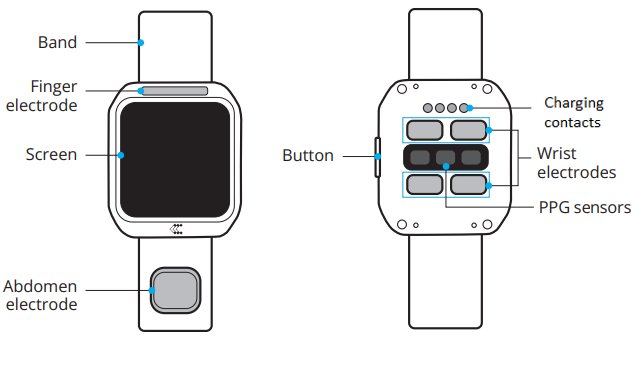
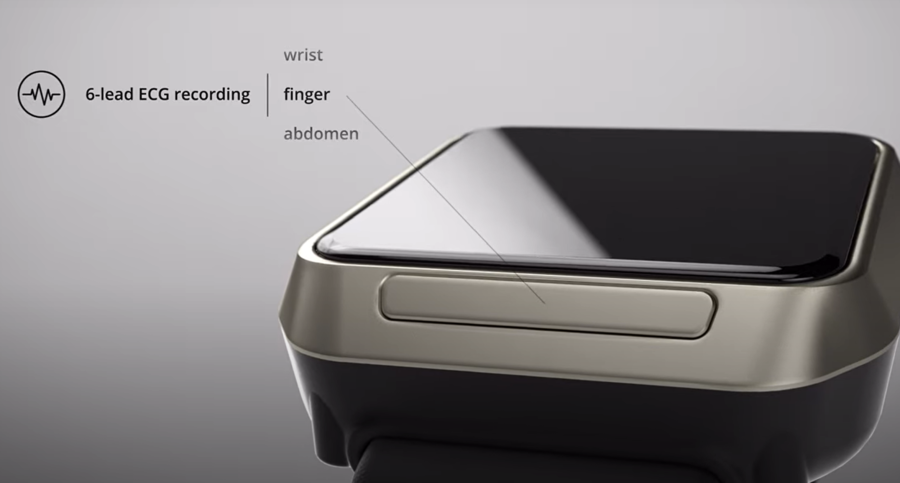
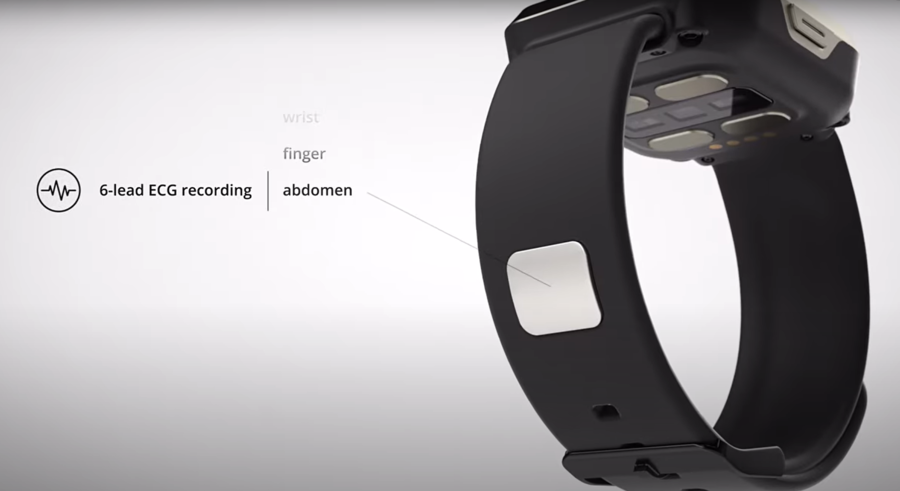
Electrodes for ECG reading
Electrodes
 |
 |
 |
Start using TeltoHeart
How to use TeltoHeart
Powering on

|
Press and hold the side button for at least 10 seconds until the device screen powers on. |

|
On first power-on, TeltoHeart will prompt you to download the TeltoHeart application. |
download and open
by Teltonika

|
Your device name will appear on the TeltoHeart screen so you can locate it in the app. |
device

|
Visit TeltoHeart to download the app, scan the QR code below, or search for TeltoHeart by Teltonika Telemedic on the App Store or Google Play. |
|
Scan to download from the Apple Store |
Scan to download from Google Play |
|
|
|



|
After installing the app, tap  to open it. to open it.
|
Registration
There are two registration options.
Register as a user
|
|
Open the TeltoHeart application. |
|
|
Tap CREATE ACCOUNT. |

|
|
Fill in the required information. |
|
|
Tap Continue to proceed. |

|
|
Enter your phone number. |


|
Enter the verification code sent via SMS to your phone. |


|
Fill in the remaining details to complete registration. |


|
Account created successfully. |

Receive an invitation
|
|
Sign in using the email address and password provided by your clinic. Tap Log in to proceed. |

|
|
The app will prompt you to change the default password to one of your choice. |

|
|
Fill in the remaining details to complete registration. |
|
|
Review and accept the Terms and Conditions and Privacy Policy. |
|
|
Once signed in, grant Bluetooth permissions when prompted. Tap Allow. |
How to pair TeltoHeart with the mobile application
|
|
Tap PAIR YOUR DEVICE to begin the pairing process. |

|
|
Accept Bluetooth permissions when prompted. |
|
|
The app will scan for nearby devices. |

|
|
Select your TeltoHeart by tapping its name. |

|
|
TeltoHeart will display an incoming pair request.
Enter the code on your phone to pair with the
device 900065
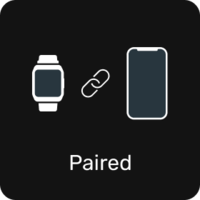
Note: Closing the app will stop data transfer to the TeltoCare platform.
|
Recording an ECG
Recording an ECG
Before you start
- TeltoHeart uses photoplethysmography (PPG) and electrocardiogram (ECG) to measure and record physiological parameters.
- To transmit ECG data, ensure TeltoHeart and the mobile app are paired on iOS 14+ or Android 10+.
- Open the ECG function in the TeltoHeart app to activate ECG recording.
Setup
- Push the side button once to open the ECG recording feature.
- Follow the on-screen instructions.
How to take an ECG recording
|
|
Follow the on-screen instructions and tap NEXT. |
|
|
Sit down. Ensure TeltoHeart is on your left wrist, strapped firmly but comfortably. |
|
|
Place and hold the abdomen electrode on the left side of your abdomen at belly-button level. |

|
|
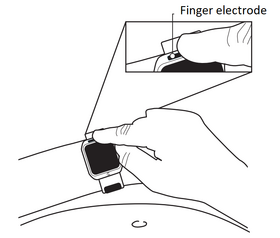
While holding the abdomen electrode in place, rest your right hand finger on the finger electrode above the screen. |
|
|
Select 1-LEAD or 6-LEAD recording. Keep your finger on the electrode and remain still throughout. |
|
|
The recording lasts 60 seconds. |
|
|
Once finished, Recording completed will appear on the TeltoHeart screen. |
Note:
- Keep the TeltoHeart app running in the background to allow data transfer.
- ECG recordings cannot be performed if battery charge is below 10%.
How to view data
Note:
- Data synchronises hourly. Measurements may take a few minutes to appear on the platform.
- ECG and Atrial Fibrillation data transfer instantly after an event or measurement.
- You can trigger a manual sync by tapping the SYNC NOW button.
|
|
Open the TeltoHeart application. |
|
|
Enter your login credentials. |
|
|
Tap Sign in to access your account. |
|
|
You will be directed to the Dashboard, where all health data is displayed. |
|
|
Locate the ECG section. |

|
|
Review the ECG recordings in the Dashboard. |
|
|
If ECG data is missing, use SYNC NOW in the app to manually trigger a data transfer to the TeltoCare platform. |

Dashboard metrics
Heart Health Score
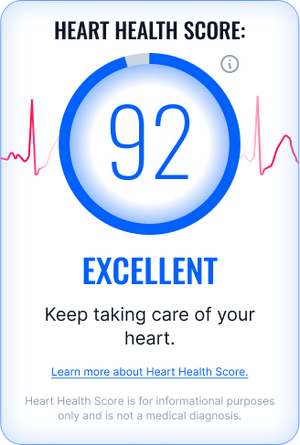
The Heart Health Score is calculated from three components:
| S — Steps | H — Heart Rate | A — AFib Events |
For more detail, tap Learn more about Heart Health Score in the app.
Atrial Fibrillation

TeltoHeart continuously monitors your pulse rhythm via light-based sensing. If the heartbeat pattern becomes consistently irregular in a way typical of atrial fibrillation, the system flags a possible AF episode and recommends taking an ECG. AF events can be reviewed in the Possible AFibs detected tab.
Events

The Events tab displays logged health events:
- High Heart Rate
- Low Heart Rate
- Atrial Fibrillation event
Electrocardiogram (ECG)
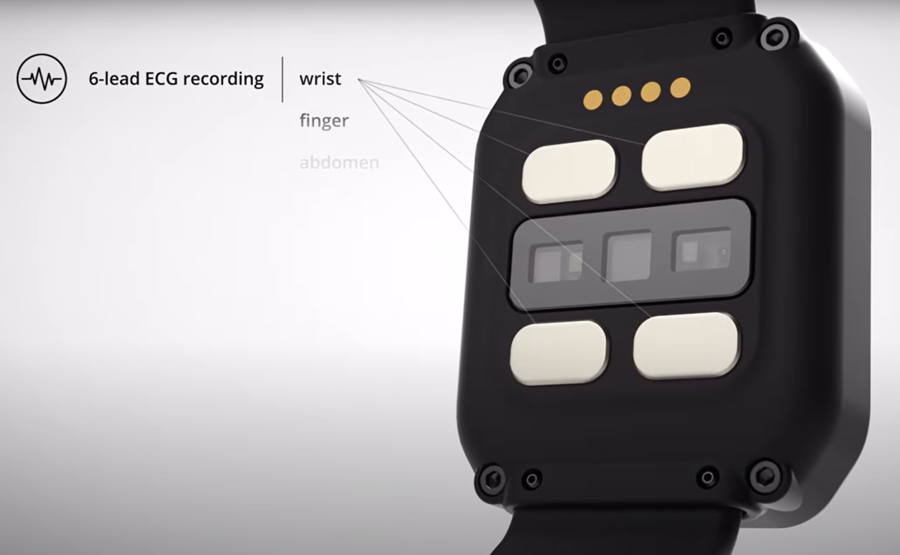
TeltoHeart records your heart's electrical activity through skin-contact electrodes and reconstructs it into 6 different ECG views. Multiple perspectives detect rhythm problems more accurately than single-lead wearables.
Download an ECG report

Tap  Download to save your ECG report.
Heart Rate

TeltoHeart measures heart rate by shining light into your skin and tracking blood flow. Each pulse creates a waveform peak, and the time between peaks is used to calculate beats per minute. Heart rate is only measured when there is no movement present, for maximum accuracy.
Steps

TeltoHeart counts steps using a built-in motion sensor that detects wrist movement, identifying individual steps and continuously updating your daily step count.
AFib Burden

AFib burden shows what percentage of your monitoring period was spent in atrial fibrillation. It is calculated by dividing total AFib time by total monitoring time.
Example: 1 hour of AFib in a 24-hour period = ~4.2% AFib burden.
Sleep Quality

Sleep Quality is estimated from nighttime heart rate patterns. The score reflects how much your heart rate decreases during sleep and how low it becomes before waking, indicating the level of overnight recovery.
Stress Level

Stress Level is estimated from heart rate variability measured by ECG. Lower variation between heartbeats indicates higher stress; higher variation indicates better recovery.
TeltoHeart application status icon
|


How to power off or restart TeltoHeart
|
|
From the main screen, swipe up and navigate to Settings. |
|
|
Tap Power and hold the POWER OFF button to turn off TeltoHeart. |
Cleaning instructions
|
Step 01 Power Off Ensure your TeltoHeart smart wearable is powered off before you begin cleaning.
|
Step 02 Prepare Cloth Use a soft cloth and apply a small amount of Isopropanol Alcohol (70%), commonly used in medicine for sterilization, onto it.
|
Step 03 Wipe Gently Gently wipe the main body and the band with the alcohol-covered cloth. Be careful around sensitive areas like the screen and any ports.
|
Step 04 Crevices & Edges Pay special attention to crevices and edges, ensuring any dirt or grime is effectively removed from all gaps.
|
|
Step 05 Dry Cloth Wipe Use a dry, soft cloth to remove any excess cleaner from the TeltoHeart main body and the band.
|
Step 06 Inspect Device Check the device to ensure there are no remaining traces of alcohol or residue left on any surface.
|
Step 07 Power On & Test Once everything is dry, power on your TeltoHeart and ensure it functions properly before wearing.
|
Step 08 Clean Regularly Clean your TeltoHeart regularly to maintain its appearance and ensure long-term functionality and hygiene.
|
Technical specifications
Safety
Contraindications, Cautions, Warnings and Notes
CONTRAINDICATIONS

|
Users with pacemakers, implantable cardioverter-defibrillators (ICDs), or other active implanted medical devices that could stimulate the heart. |
|
|
Users with other active implantable or non-implantable medical devices that may interfere with the device's electromagnetic field. |
|
|
Not intended for users with dementia or other cognitive inability to use the device unless supervised. |
|
|
Users with conditions restricting their ability or willingness to use the device as intended. |
|
|
Users with exaggerated emotional instability, elevated anxiety disorders, panic attacks, or other mental disorders that may be triggered by the device. |
|
|
Absence, severe deformations, or paralysis of one or both upper limbs. |
|
|
Allergy or increased sensitivity to the device materials. |
|
|
Compromised local tissue conditions (wounds, fractures, ruptures, etc.) at the contact location. |
CAUTIONS
Handling and care
|
|
Do NOT use on wounds — this may cause infection and pain. Treat wounds first. |
|
|
Patients with skin photosensitivity conditions should not use the device. |
Warranty and claims
|
|
Any third-party modifications will void the warranty. |
|
|
Failure to use or maintain the device as instructed may exclude warranty claims. |
Connectivity and data management
|
|
If data cannot be saved locally on your smartphone, clear the cache and try again. |
|
|
The device requires a stable internet connection to function properly. |
Environmental and safety precautions
|
|
Avoid sandy environments. Do not submerge in salt water or conductive liquids. Do not use in MRI or CT environments. |
|
|
TeltoHeart is not intended for underwater use. |
Device usage and limitations
|
|
Do not use near strong electromagnetic fields or ultrasound equipment. |
|
|
Do not use during strong vibration (e.g. rammer compactors, hammer drills). |
|
|
For use on intact skin only. Do not wear over moles, birthmarks, psoriasis, or skin defects. |
|
|
Intended for adults aged 22 and older. Not for use during medical procedures (MRI, diathermy, lithotripsy, defibrillation, surgery). |
|
|
If heating occurs, stop using immediately. Do not expose to temperatures above 45 °C. |
|
|
Do not apply paint or stickers; do not cause mechanical shock or excessive pressure. |
|
|
Do not use corrosive chemicals for cleaning. Keep the docking station magnetic connection free of metallic bodies. |
|
|
Oily, muddy, or contaminated skin will worsen ECG/PPG quality. Clean skin before recording. |
|
|
Darker skin tones on the wrist may affect PPG performance. Factors including motion, tattoos, low blood flow, body fat, body hair, and dry skin may reduce recording quality. |
|
|
Do not self-diagnose or self-medicate based on device readings. Readings are potential findings, not a diagnosis. Always consult a qualified physician. |
|
|
After unpairing or resetting TeltoHeart, all data (settings, ECG, HR) is permanently deleted. |
WARNINGS
Battery safety

|
If the device starts heating, stop use immediately to prevent battery or component damage. |
|
|
Do NOT short-circuit charging contacts. Contact with metal objects (coins, clips, keys) can cause short-circuits and damage the device. |
Charging safety
|
|
Use only USB Type-C cables compliant with USB 2.0 or later and applicable safety standards. Using damaged cables or charging with liquid/moisture present can cause electric shock or fire. |
|
|
Ensure the cable or dock is fully inserted into the power adapter before connecting to an outlet. The Li-Po battery must be serviced by Teltonika Telemedic or an authorised provider only. |
Environmental and user safety
|
|
Do NOT use outside operating temperature range (e.g. in a sauna). |
|
|
Comply with all regulations on mobile device usage while driving. Safe vehicle operation is always the first priority. |
|
|
Exaggerated movement impairs measurement accuracy. Users with bruised skin, cuts, scars, excessive body fat, or very dry skin may experience reduced sensor performance. |
NOTES
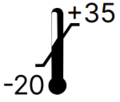
- Device operating temperature: −10 to +45 °C. Do not use outside this range.
- Keep device electrodes clean for best performance. Do not take recordings if electrodes are dirty.
- Usage in rain or very humid environments is not recommended.
- TeltoHeart application and TeltoCare share the same login credentials.
- Keep the TeltoHeart app running in the background to allow continuous data transfer.
- ECG recordings cannot be performed if battery is below 10%.
- Do not take recordings during physical activity.
- Do NOT reset the device during a firmware update. Charge fully before initiating updates.
- The system will not back up data or send information to medical experts without an internet connection.
- Device shall be used on the left hand wrist only.
- Do not share your password with anyone. Sign-in details are cleared on logout.
- After deleting your account, all data will be lost. Support cannot restore deleted health data after 14 days.
- Implanted devices (pacemakers, defibrillators) may react to magnets and radio signals — maintain a safe distance from the charging equipment.
- Patient health information from the device represents potential findings, not a diagnosis.
All safety indications can be found on our TeltoHeart Safety Instructions wiki page.
Warranty
Warranty conditions and term shall apply in accordance with agreed conditions between you and your supplier. It is important to carefully read and follow all information for users (including the quick start guide, technical specifications, and user manual) and the terms and conditions provided by the manufacturer. Failure to adhere to these guidelines may result in malfunctions or damage to the product, for which the manufacturer cannot be held responsible.
Equipment symbols
 |
Manufacturer |
|
|
Consult instructions for use |
 Protection against ingress of water or particulate matter |
 |
 Type BF applied part |

Environmental conditions
|
Temperature limit |
 Humidity limit |
 Atmospheric pressure limit |
Certifications
 |
 FCC ID: 2BAIF-ECG200 |
IC ID: 27304-ECG200 |
 |
Additional information
Product Page
Changelog
TeltoCare Manual
DOCUMENTATION
English

Updated: 2024-08-08
Updated: 2024-09-06
Updated: 2024-06-18
Updated: 2024-07-11
Updated: 2024-02-07
Updated: 2025-02-14
Lithuanian
Updated: 2024-09-06
Updated: 2024-06-18
Updated: 2024-09-25
Updated: 2025-02-17
Polish
Updated: 2024-09-06
Updated: 2024-07-10
TeltoHeart Mobile Application
|
|
|
PROMOTIONAL MATERIAL
CERTIFICATES
All newest certificates can be found on our Certifications and Approvals wiki page.