
Main Page: Difference between revisions
No edit summary |
No edit summary |
||
| (8 intermediate revisions by the same user not shown) | |||
| Line 1: | Line 1: | ||
<div style="display: flex; justify-content: center;"> | <!-- Product Cards --> | ||
<! | <div style="display: flex; justify-content: center; gap: 24px; flex-wrap: wrap; margin-bottom: 32px;"> | ||
<div | |||
<!-- TeltoHeart Card --> | |||
<div style="width: 340px; border: 1px solid #e0e0e0; border-top: 4px solid #3366cc; border-radius: 16px; overflow: hidden; background: #ffffff; box-shadow: 0 2px 8px rgba(0,0,0,0.06); display:flex; flex-direction:column;"> | |||
<div style="background: #f8f9fa; padding: 24px; text-align: center; height:180px; display:flex; align-items:center; justify-content:center; overflow:hidden;"> | |||
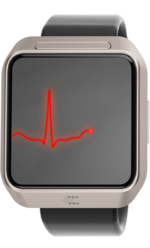
[[File:Teltoheart_display.png|150px|link=|center]] | |||
</div> | |||
< | <div style="padding: 20px; text-align: center; display:flex; flex-direction:column; flex:1;"> | ||
<div style="font-size: 19px; font-weight: 700; color: #1a1a1a; margin-bottom: 8px; letter-spacing: -0.3px;">TeltoHeart</div> | |||
</div> | <div style="font-size: 13px; color: #555; line-height: 1.7; margin-bottom: 16px;">Multifunctional smart wearable with an exceptional set of features and design which allows the user to record 6-lead electrocardiogram and detects atrial fibrillation or other arrhythmias with MyHealth app.</div> | ||
<div style="margin-top:auto; padding-bottom:4px;"> | |||
<div style="display:inline-block; background:#3366cc; border-radius:8px; overflow:hidden;">[[TeltoHeart|<span style="display:inline-block; padding:9px 28px; color:#ffffff; font-size:13px; font-weight:bold; text-decoration:none;">Learn More →</span>]]</div> | |||
</div> | |||
</div> | |||
</div> | |||
<!-- TeltoCare Card --> | |||
<div style="width: 340px; border: 1px solid #e0e0e0; border-top: 4px solid #0e9e8e; border-radius: 16px; overflow: hidden; background: #ffffff; box-shadow: 0 2px 8px rgba(0,0,0,0.06); display:flex; flex-direction:column;"> | |||
<div style="background: #f8f9fa; padding: 24px; text-align: center; height:180px; display:flex; align-items:center; justify-content:center; overflow:hidden;"> | |||
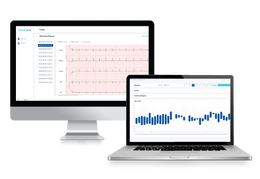
[[File:Teltocare PC.png|260px|link=|center]] | |||
</div> | |||
<div style="padding: 20px; text-align: center; display:flex; flex-direction:column; flex:1;"> | |||
<div style="font-size: 19px; font-weight: 700; color: #1a1a1a; margin-bottom: 8px; letter-spacing: -0.3px;">TeltoCare</div> | |||
<div style="font-size: 13px; color: #555; line-height: 1.7; margin-bottom: 16px;">TeltoCare is used to display electrocardiogram and heart rate data collected by TeltoHeart and transmitted by TeltoHeart mobile application for further analysis and interpretation by qualified clinicians.</div> | |||
<div style="margin-top:auto; padding-bottom:4px;"> | |||
<div style="display:inline-block; background:#0e9e8e; border-radius:8px; overflow:hidden;">[[TeltoCare|<span style="display:inline-block; padding:9px 28px; color:#ffffff; font-size:13px; font-weight:bold; text-decoration:none;">Learn More →</span>]]</div> | |||
</div> | |||
</div> | |||
</div> | |||
</div> | </div> | ||
< | <hr style="border: none; border-top: 1px solid #e0e0e0; margin: 8px 0 24px 0;"> | ||
<!-- | |||
<div | <!-- Info Cards Row --> | ||
<div style="display: flex; justify-content: center; gap: 20px; flex-wrap: wrap; align-items: stretch;"> | |||
<!-- FAQ --> | |||
<div style="width: 220px; background: #ffffff; border: 1px solid #e0e0e0; border-radius: 14px; padding: 20px; text-align: center; box-shadow: 0 2px 8px rgba(0,0,0,0.06); display:flex; flex-direction:column;"> | |||
<div style="width:56px; height:56px; border-radius:50%; background:#e8f0fe; margin: 0 auto 12px auto; font-size:26px; line-height:56px; text-align:center;">💬</div> | |||
<div style="font-size: 15px; font-weight: 700; color: #3366cc; margin-bottom: 4px;">[[FAQ|FAQ]]</div> | |||
<div style="font-size: 12px; color: #777; margin-bottom: 12px; line-height:1.5;">Frequently Asked Questions</div> | |||
<div style="border-top: 1px solid #f0f0f0; padding-top: 10px; flex:1; display:flex; flex-direction:column;"> | |||
<div style="margin-bottom: 6px; font-size: 13px;">[[FAQ#TeltoHeart|TeltoHeart]]</div> | |||
<div style="margin-bottom: 6px; font-size: 13px;">[[FAQ#TeltoCare|TeltoCare]]</div> | |||
<div style="margin-top:auto; padding-top:10px; font-size:13px; font-weight:700;">[[FAQ|View all →]]</div> | |||
</div> | |||
</div> | |||
<!-- Downloads --> | |||
<div style="width: 220px; background: #ffffff; border: 1px solid #e0e0e0; border-radius: 14px; padding: 20px; text-align: center; box-shadow: 0 2px 8px rgba(0,0,0,0.06); display:flex; flex-direction:column;"> | |||
<div style="width:56px; height:56px; border-radius:50%; background:#e0f7f5; margin: 0 auto 12px auto; font-size:26px; line-height:56px; text-align:center;">📥</div> | |||
<div style="font-size: 15px; font-weight: 700; color: #0e9e8e; margin-bottom: 4px;">[[Downloads|Downloads]]</div> | |||
<div style="font-size: 12px; color: #777; margin-bottom: 12px; line-height:1.5;">File Downloads</div> | |||
<div style="border-top: 1px solid #f0f0f0; padding-top: 10px; flex:1; display:flex; flex-direction:column;"> | |||
<div style="margin-bottom: 6px; font-size: 13px;">[[TeltoHeart_Promotional_Material|TeltoHeart Promo]]</div> | |||
<div style="margin-bottom: 6px; font-size: 13px;">[[TeltoCare_Promotional_Material|TeltoCare Promo]]</div> | |||
<div style="margin-top:auto; padding-top:10px; font-size:13px; font-weight:700;">[[Downloads|View all →]]</div> | |||
</div> | |||
</div> | |||
---- | <!-- General Information --> | ||
<div style="width: 220px; background: #ffffff; border: 1px solid #e0e0e0; border-radius: 14px; padding: 20px; text-align: center; box-shadow: 0 2px 8px rgba(0,0,0,0.06); display:flex; flex-direction:column;"> | |||
<div style="width:56px; height:56px; border-radius:50%; background:#fef3e0; margin: 0 auto 12px auto; font-size:26px; line-height:56px; text-align:center;">📖</div> | |||
<div style="font-size: 15px; font-weight: 700; color: #e07b00; margin-bottom: 4px;">[[General information|General Info]]</div> | |||
<div style="font-size: 12px; color: #777; margin-bottom: 12px; line-height:1.5;">Product Information Resources</div> | |||
<div style="border-top: 1px solid #f0f0f0; padding-top: 10px; flex:1; display:flex; flex-direction:column;"> | |||
<div style="margin-bottom: 6px; font-size: 13px;">[[TeltoHeart_First_Start|First Start — TeltoHeart]]</div> | |||
<div style="margin-bottom: 6px; font-size: 13px;">[[TeltoCare_First_Start|First Start — TeltoCare]]</div> | |||
| | <div style="margin-bottom: 6px; font-size: 13px;">[[TeltoHeart_firmware/software_changelogs|TeltoHeart Changelog]]</div> | ||
<div style="margin-bottom: 6px; font-size: 13px;">[[TeltoCare_software_changelogs|TeltoCare Changelog]]</div> | |||
<div style="margin-bottom: 6px; font-size: 13px;">[[TeltoHeart_Nomenclature,_classification_codes|Nomenclature]]</div> | |||
<div style="margin-bottom: 6px; font-size: 13px;">[[TeltoHeart_Certification_%26_Approvals|Certificates]]</div> | |||
<div style="margin-top:auto; padding-top:10px; font-size:13px; font-weight:700;">[[General information|View all →]]</div> | |||
</div> | |||
</div> | |||
</div> | |||
Latest revision as of 13:35, 16 June 2026
📖
Product Information Resources