|style="padding:10px;vertical-align:top;"|'''Power on:'''<br>'''a)''' Hold the side button for at least 10 seconds.<br>'''b)''' Place TeltoHeart on the charging dock.
|style="padding:10px;vertical-align:top;"|'''Power on:'''<br>'''a)''' Hold the side button for at least 13 seconds.<br>'''b)''' Place TeltoHeart on the charging dock.
If your TeltoHeart has recently been turned off and you are having trouble turning it back on: Wait at least one minute before attempting to turn it back on, as it may need time to fully power down.
Power on: a) Hold the side button for at least 13 seconds. b) Place TeltoHeart on the charging dock.
Charge the device: Ensure TeltoHeart is charged. Connect it to the charging dock and verify it is charging. If not, try a different cable or adapter.
Check charging connections: Ensure charging contacts on TeltoHeart and the dock are clean and free of debris. Gently clean with a soft, dry cloth if needed.
Check the button: Make sure the side button is not stuck. Press it gently a few times to verify it functions properly.
Contact customer support: If none of the above steps work, contact customer support for further assistance.
How to turn on TeltoHeart?
Hold the button for at least 13 seconds, or place it on the charging adapter.
Why does the battery drain quickly?
Battery life depends on ECG recording frequency, how often data is transferred to the mobile app, screen brightness, and how frequently the screen is activated.
📶 Connectivity, Pairing & Bluetooth Issues
Failed to pair the device
If your device and phone fail to pair, follow these steps:
Check compatibility: Ensure the TeltoHeart app is used with iOS 14 or later / Android 10 or later.
Check Bluetooth settings: Verify Bluetooth is turned on and the device is in pairing mode.
Forget and re-pair: If previously paired, forget the device from your phone's Bluetooth settings and re-pair from scratch.
Restart both devices: Turn off both your device and phone, then turn them back on.
Paired device prior to registering / logging in
If you paired via phone Bluetooth settings instead of the TeltoHeart app, follow these steps:
Unpair TeltoHeart: Go to Bluetooth settings on both devices and select Forget / Unpair.
Check for firmware updates: After pairing through the app, check for and install any available firmware updates.
TeltoHeart application cannot find a firmware update
Try logging out and back in to the application.
Delete the application and re-download it from the app store.
🔄 Data Sync & Visibility Issues
Why are there no data on the TeltoCare platform?
Ensure the device and mobile phone are connected via Bluetooth, then press SYNC NOW in the TeltoHeart app. Data also syncs automatically in the background at least once per hour when Bluetooth is connected.
Check phone storage: If phone storage is full, it may not process incoming data. Delete unnecessary files or apps to free up space.
Contact customer support: If none of the above steps work, contact the TeltoCare customer support team.
Cannot see my data
Use SYNC NOW in the TeltoHeart app to manually trigger a data transfer to TeltoCare. Although data syncs periodically, this option ensures immediate availability of your measurements.
Please note: Data upload may take up to 15 minutes.
Where can I see the data?
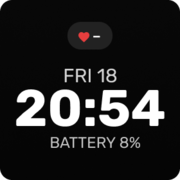
The device displays minimum, maximum, and current heart rate values, plus the time of the last suspected AFib episode. In TeltoCare you can also view ECG recordings, AFib burden, and more.
❤️ Heart Rate & Wrist Detection Issues
Heart Rate signal missing
If the sensor has difficulty detecting heart rate, "–" appears on screen. TeltoHeart prioritizes resting measurements to minimize motion artifacts and provide reliable data.
Make sure there is no movement during measurement.
Failure to detect wrist
TeltoHeart uses light-based sensors (PPG) and electrode leads to detect wrist presence. To ensure proper detection:
Ensure secure fit: Secure TeltoHeart just above the wrist bone as illustrated in the user manual.
Check for hair: Excessive wrist hair may hinder optical sensors. Ensure skin beneath the device is unobstructed.
Assess skin contact: Remove anything obstructing direct skin contact, such as clothing or accessories.
Verify positioning: Wear the device approximately 1 cm above the wrist bone for proper sensor alignment.
How to set heart rate frequency?
The heart rate is displayed on the main screen and in the "Heart rate" app.
📈 ECG Related Issues
Why is the ECG signal of poor quality?
During recording, stay still and ensure maximum contact between skin and electrodes. Apply enough pressure to keep muscles relaxed during measurement.
Why did the ECG recording stop by itself?
The screen may have been activated by accidental touch. To prevent this, disable screen wake-up on lifting and on touch by swiping up on the main screen and opening the screen settings menu.
Stay calm and avoid any movement during ECG measurement.
Keep electrodes clean. Dirt, sweat, or debris can interfere with readings. Clean sensors with a soft, dry cloth regularly.
Excessive hair on the wrist or abdomen may hinder optical sensors. Ensure skin beneath the device is unobstructed.
Higher melanin levels can sometimes affect certain sensor types used in ECG monitoring.
Does the device automatically record ECG?
No. ECG recording only starts when the user selects "Record ECG" or "Start ECG" on screen.
💓 AFib Related Issues
What to do if it shows an AFib message?
If you receive a suspected atrial fibrillation notification, record an ECG and consult a medical professional.
How does the device notify about AFib?
If atrial fibrillation is suspected, TeltoHeart vibrates and displays a notification suggesting to take an ECG.
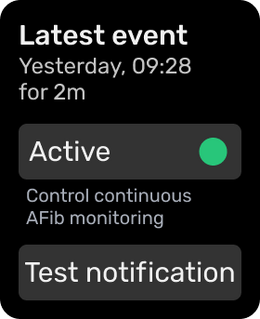
No Atrial Fibrillation data — check if AFib is enabled
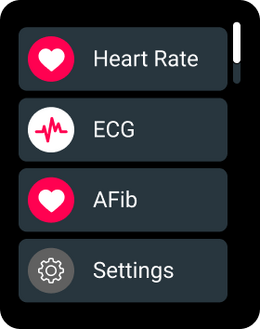
Tap the side button to open the menu and select the AFib function.
Tap "Active" to activate atrial fibrillation monitoring.
How to set notifications?
To toggle AFib monitoring: press the button → open "AF" → change "Active" status. To toggle high/low HR alerts: press the button → "Settings" → "Heart rate notifications" → change "Alert" status.
🌐 Time, Language & General Settings
Incorrect time or date
This is usually caused by a lost connection to the phone. Follow these steps:
Synchronize time: If you changed time zones, tap SYNC NOW in the TeltoHeart mobile app to update the time.
Check Bluetooth connection: Verify phone Bluetooth is on and TeltoHeart is connected. If not, re-pair through the TeltoHeart application.
Restart TeltoHeart: Swipe up on the home screen to open the control center and tap the power icon to restart, or hold the button for 10+ seconds.
Update firmware: Outdated firmware may cause time/date issues. Check for updates in the TeltoHeart mobile app and install if available.
How to change the language?
In TeltoHeart, go to the menu → "Settings" → "Language." All supported languages will be listed — select one and confirm.
🔑 Account & Password Issues
Forgot password for TeltoHeart app or TeltoCare
On the login page, tap the Forgot Password option.
Enter your account email address and click Reset my password.
Check your email for a reset code and enter it in the application.
Create a strong new password you will remember.
Log in to the TeltoHeart app or TeltoCare with your new password.
TeltoCare Platform
Patient management & data questions
👤 Patient Account & Management
How to create a patient account?
Log in to TeltoCare with a doctor or administrator account. Go to "Patient List," select "Create Patient," fill in the required information, and click "Create."
How can a patient create an account?
Via the TeltoHeart mobile app or at https://teltocare.com. Select the registration option, enter the required information, and you will receive a temporary password by email to change to your desired password.
How to verify a patient?
A hospital administrator clicks "Patients," selects the patient with "In Queue" status, clicks , and selects "Invite."
How to delete a patient?
Select the patient in the patient list, click , then select "Delete."
Are patient data saved after deletion?
Deleted data is no longer visible but is stored for 14 days. The account can be restored within that period by the hospital, technical support, or an administrator.
How to transfer a patient to another doctor or clinic?
Go to the patient's profile, click edit patient, and assign a doctor from the doctor list.
How to restrict patient visibility to other doctors?
Go to the doctor's account, click edit doctor, then go to "User Permissions" and configure the desired permissions.
Can a patient be assigned to multiple clinics?
No, a patient cannot be assigned to multiple clinics at the same time.
Can I log in to the TeltoHeart app with a doctor, hospital, or distributor account?
No. Only a patient account can link TeltoHeart and send data to TeltoCare. Other account types are not intended for data collection.
Will I see all patients or just my own?
Hospital and doctor accounts can see the entire hospital patient list. Doctor accounts can additionally filter by patients assigned to them.
📊 Viewing & Managing Data in TeltoCare
Where to see patient data?
After logging in, open the patient's profile from the patient list. Here you can view all information including medical records, ECG data, and more.
How to print / download an ECG?
In the patient's profile under "Electrocardiogram," select the desired record and click "Export" or "Print" to download a PDF.
Is there a caliper function?
Yes. TeltoCare includes a caliper function for measuring ECG intervals, available in the "Electrocardiogram" section.
How to delete an unreadable ECG?
Currently, there is no option to delete ECG recordings.
How to filter patient ECGs by indication?
In "Electrocardiogram," find the symbol next to each record, which indicates the patient's stated reason for the recording.
How to filter data by time interval (weekly, monthly, yearly)?
Use the time interval selector to set start/end dates or filter by hours, days, weeks, months, or years.
Where to see AFib notifications?
Atrial fibrillation notifications are visible in the "Atrial Fibrillation" section of the patient's profile.