
Recording an ECG: Difference between revisions
Created page with "==Recording an ECG== {| class="tlt-border" style="border: 1px solid #e8e8e8; background: white; width: 100%;" |- |colspan="3" style="text-align: center; background: white; pad..." |
|||
| Line 1: | Line 1: | ||
==Recording an ECG== | == Recording an ECG == | ||
<div style="background:#ffffff; border:1px solid #e0e8f4; border-radius:12px; padding:32px; margin-bottom:8px;"> | |||
<p style="font-size:26px; font-weight:700; color:#0054A6; margin:0 0 24px; text-align:center;">Recording an ECG</p> | |||
=== Before you start === | |||
* TeltoHeart uses '''photoplethysmography (PPG)''' and '''electrocardiogram (ECG)''' to measure and record physiological parameters. | |||
* To transmit ECG data, ensure TeltoHeart and the mobile app are paired on '''iOS 14+''' or '''Android 10+'''. | |||
* Open the ECG function in the TeltoHeart app to activate ECG recording. | |||
=== Setup === | |||
* Push the side button once to open the ECG recording feature. | |||
* Follow the on-screen instructions. | |||
=== How to take an ECG recording === | |||
{| style="width:100%; border-collapse:collapse;" | |||
|- | |- | ||
| | | style="width:52px; vertical-align:top; padding:0 0 16px;" | [[Image:Nr1.png|40px|link=]] | ||
| style="padding:0 0 16px 16px; font-size:15px; vertical-align:top;" | Follow the on-screen instructions and tap '''NEXT'''. | |||
|- | |- | ||
| | | style="width:52px; vertical-align:top; padding:0 0 16px;" | [[Image:Nr2.png|40px|link=]] | ||
| style="padding:0 0 16px 16px; font-size:15px; vertical-align:top;" | Sit down. Ensure TeltoHeart is on your '''left wrist''', strapped firmly but comfortably. | |||
|} | |||
<div style="text-align:center; margin:8px 0 20px;">[[Image:Wrist.png|280px|link=]]</div> | |||
{| style="width:100%; border-collapse:collapse;" | |||
|- | |- | ||
| | | style="width:52px; vertical-align:top; padding:0 0 16px;" | [[Image:Nr3.png|40px|link=]] | ||
| style="padding:0 0 16px 16px; font-size:15px; vertical-align:top;" | Place and hold the '''abdomen electrode''' on the left side of your abdomen at belly-button level. | |||
|} | |||
<div style="text-align:center; margin:8px 0 20px;">[[File:Group 70672.png|280px]]</div> | |||
{| style="width:100%; border-collapse:collapse;" | |||
|- | |- | ||
| | | style="width:52px; vertical-align:top; padding:0 0 16px;" | [[Image:Nr4.png|40px|link=]] | ||
[[Image: | | style="padding:0 0 16px 16px; font-size:15px; vertical-align:top;" | While holding the abdomen electrode in place, rest your '''right hand finger on the finger electrode''' above the screen. | ||
| | |||
|} | |} | ||
<div style="text-align:center; margin:8px 0 20px;">[[Image:ECG_measurement-3.png|280px|link=]]</div> | |||
| | {| style="width:100%; border-collapse:collapse;" | ||
| | |- | ||
| style="width:52px; vertical-align:top; padding:0 0 16px;" | [[Image:Nr5 - Copy.png|40px|link=]] | |||
| style="padding:0 0 16px 16px; font-size:15px; vertical-align:top;" | Select '''1-LEAD or 6-LEAD''' recording. Keep your finger on the electrode and remain still throughout. | |||
| [[Image: | |- | ||
| | | style="width:52px; vertical-align:top; padding:0 0 16px;" | [[Image:Nr6.png|40px|link=]] | ||
| style="padding:0 0 16px 16px; font-size:15px; vertical-align:top;" | The recording lasts '''60 seconds'''. | |||
| [[Image: | |||
| | |||
|- | |- | ||
| style="width:52px; vertical-align:top;" | [[Image:Nr7.png|40px|link=]] | |||
| style="padding:0 0 0 16px; font-size:15px; vertical-align:top;" | Once finished, '''Recording completed''' will appear on the TeltoHeart screen. | |||
|| ''' | |||
|} | |} | ||
<div style="background:#EEF6FF; border-left:4px solid #0054A6; border-radius:0 8px 8px 0; padding:14px 18px; margin-top:20px; display:flex; align-items:flex-start; gap:12px;"> | |||
[[File:Note_icon.png|24px|link=]] | |||
<div> | |||
'''Note:''' | |||
* Keep the TeltoHeart app running in the background to allow data transfer. | |||
* ECG recordings cannot be performed if battery charge is below '''10%'''. | |||
</div> | |||
</div> | |||
</div> | |||
<!-- ═══════════════════════════════════════════════ | |||
HOW TO VIEW DATA | |||
════════════════════════════════════════════════ --> | |||
Latest revision as of 16:25, 10 June 2026
Recording an ECG
Recording an ECG
Before you start
- TeltoHeart uses photoplethysmography (PPG) and electrocardiogram (ECG) to measure and record physiological parameters.
- To transmit ECG data, ensure TeltoHeart and the mobile app are paired on iOS 14+ or Android 10+.
- Open the ECG function in the TeltoHeart app to activate ECG recording.
Setup
- Push the side button once to open the ECG recording feature.
- Follow the on-screen instructions.
How to take an ECG recording

|
Follow the on-screen instructions and tap NEXT. |

|
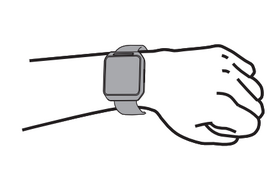
Sit down. Ensure TeltoHeart is on your left wrist, strapped firmly but comfortably. |

|
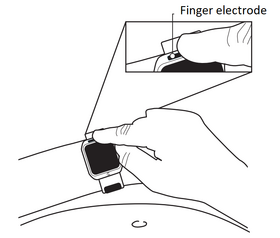
Place and hold the abdomen electrode on the left side of your abdomen at belly-button level. |


|
While holding the abdomen electrode in place, rest your right hand finger on the finger electrode above the screen. |

|
Select 1-LEAD or 6-LEAD recording. Keep your finger on the electrode and remain still throughout. |

|
The recording lasts 60 seconds. |

|
Once finished, Recording completed will appear on the TeltoHeart screen. |

Note:
- Keep the TeltoHeart app running in the background to allow data transfer.
- ECG recordings cannot be performed if battery charge is below 10%.